// CHROME EXTENSION · MV3 · SIDE PANEL

10 security tools.
One side panel.

NetRecon is a browser-based security toolkit for pentesters, sysadmins, and security researchers. Nmap scanning, DNS recon, WHOIS, SSL inspection, port scanning, CVE lookup, subdomain enumeration, and more — all without leaving your browser.

Free · No account · Chrome MV3 · Requires Node.js companion server
⚠ For authorized testing only
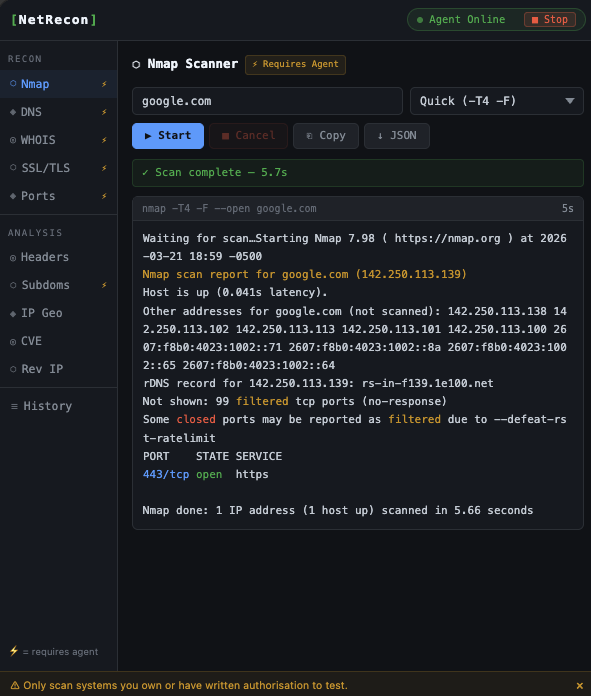
NetRecon extension — Nmap scan of google.com showing open ports
10
Security tools
Local
All processing
0
Data collected
Free
Always
// WHAT'S INCLUDED

10 tools, one panel

Every tool stores results in scan history. Copy or export to JSON with one click.

Nmap Scanner
Real-time streaming nmap output in the browser. Quick, full, SYN, vuln, and UDP scan profiles. Syntax-highlighted terminal output.
LOCAL WEBSOCKET
Port Scanner
Lightweight TCP port scanner with common, web, database, and dev presets. Custom port range support. Streams results live.
LOCAL WEBSOCKET
DNS Recon
Query A, AAAA, MX, TXT, NS, CNAME, and SOA records. Optional AXFR zone transfer attempt. Results in a clean table.
LOCAL
WHOIS Lookup
Parsed WHOIS data: registrar, registrant, dates, nameservers, and status flags. Domain age highlighted.
LOCAL
🔒
SSL / TLS Inspector
Certificate details, expiry countdown, SAN list, full chain, and vulnerability flags (SHA-1, self-signed, expired, weak key).
LOCAL
HTTP Headers
Fetch and analyse HTTP response headers. Checks 8 security headers with pass/fail badges. Flags server fingerprinting.
LOCAL
Subdomain Enumerator
Passive enumeration via crt.sh certificate transparency logs. Optional active DNS brute-force with custom or built-in wordlist.
LOCAL crt.sh
IP Geolocation & ASN
Country, region, city, coordinates, timezone, ASN, and ISP for any IP or hostname. Bogon/private address detection.
ipapi.co
CVE Lookup
Search the NVD database by CVE ID or keyword. Results include CVSS score, severity badge, description, and published date.
NVD
Reverse IP
Find all domains sharing an IP address via HackerTarget. Free tier returns up to 100 results. One-click copy to clipboard.
HackerTarget
// WORKFLOW

How it works

The companion server handles OS-level operations. The extension is the UI. Both run locally.

1
Start the server
Run the Node.js companion server on localhost. It handles nmap, DNS, SSL, and more.
2
Load the extension
Unzip and load unpacked in Chrome. Takes 30 seconds. No Chrome Web Store needed.
3
Open the panel
Click the NetRecon icon. The side panel opens alongside any page you're working in.
4
Run your scans
Pick a tool, enter a target, and go. All results are saved to scan history automatically.
// GET STARTED

Install in 5 minutes

Authorized use only. Only use NetRecon against systems you own or have explicit written permission to test. Unauthorized scanning is illegal in most jurisdictions.
1
Install Homebrew (skip if already installed)
Homebrew is a package manager for macOS. Paste this into Terminal:
/bin/bash -c "$(curl -fsSL https://raw.githubusercontent.com/Homebrew/install/HEAD/install.sh)"
2
Install Node.js and nmap
brew install node nmap
3
Extract to your home folder
Run this after downloading — it extracts directly to ~/netrecon and avoids macOS sandbox restrictions on the Downloads folder:
unzip ~/Downloads/netrecon.zip -d ~/
4
Load the extension in Chrome
Open Chrome, go to Extensions, and turn on Developer Mode (top-right toggle).
chrome://extensions
5
Click "Load unpacked"
When the folder picker opens, navigate to and select ~/netrecon — the folder you extracted in step 3. This is the folder that contains manifest.json. The NetRecon icon will appear in your Chrome toolbar once loaded.
6
Register the native launcher — one time only
Copy the 32-character extension ID from the NetRecon card at chrome://extensions, then run:
cd ~/netrecon node install.js YOUR_EXTENSION_ID Done. From now on, open the NetRecon side panel and click ▶ Start whenever you need it. The companion server launches silently in the background — no terminal, no manual steps.
1
Install Node.js 18+
Ubuntu / Debian:
curl -fsSL https://deb.nodesource.com/setup_20.x | sudo -E bash - sudo apt install -y nodejs Or install from nodejs.org. Check version with node -v
2
Install nmap
sudo apt install nmap # Debian / Ubuntu sudo yum install nmap # RHEL / CentOS sudo pacman -S nmap # Arch
3
Extract to your home folder
unzip ~/Downloads/netrecon.zip -d ~/ Dependencies are pre-bundled — no npm install needed.
4
Load the extension in Chrome
Open Chrome, go to Extensions, and turn on Developer Mode (top-right toggle).
chrome://extensions
5
Click "Load unpacked"
When the folder picker opens, navigate to and select ~/netrecon — the folder you extracted in step 3. This is the folder that contains manifest.json. The NetRecon icon will appear in your Chrome toolbar once loaded.
6
Register the native launcher — one time only
Copy the 32-character extension ID from the NetRecon card at chrome://extensions, then run:
cd ~/netrecon node install.js YOUR_EXTENSION_ID Done. From now on, open the NetRecon side panel and click ▶ Start whenever you need it. The companion server launches silently in the background — no terminal, no manual steps.
1
Install Node.js 18+
Download the Windows installer (.msi) from nodejs.org and run it. Check "Automatically install necessary tools" when prompted.
Verify in Command Prompt: node -v
2
Install nmap with Npcap
Download the Windows installer from nmap.org. Run it as Administrator and check "Install Npcap" — required for SYN scans.
Verify with: nmap --version
3
Download and extract
Right-click the zip → Extract All. Move the extracted netrecon folder somewhere permanent — for example C:\netrecon. Dependencies are pre-bundled, no npm install needed.
4
Load the extension in Chrome
Open Chrome, go to Extensions, and turn on Developer Mode (top-right toggle).
chrome://extensions
5
Click "Load unpacked"
When the folder picker opens, navigate to and select your netrecon folder — wherever you moved it in step 3 (e.g. C:\netrecon). This is the folder that contains manifest.json. The NetRecon icon will appear in your Chrome toolbar once loaded.
6
Register the native launcher — one time only
Copy the 32-character extension ID from the NetRecon card at chrome://extensions. Open Command Prompt as Administrator in your netrecon folder and run:
node install.js YOUR_EXTENSION_ID Administrator is required once to write the registry key Chrome uses to find the launcher. Done — open the NetRecon side panel and click ▶ Start whenever you need it. No terminal, no manual steps.
// UPDATES

Changelog

Bugs squashed and fixes shipped. Re-download the zip to get the latest version.

v1.0.3 March 2026
FIX
■ Stop button still showed "Agent Online" after stopping. The HTTP shutdown was silently failing against older server versions that don't have the /shutdown endpoint. The stop button now falls back to a native messaging force-kill (lsof -ti tcp:31337 | xargs kill -9) if the server is still alive after the graceful attempt — works against any version.
FIX
Scans still showed "Scan complete — 0.0s" after re-downloading. The old server remained running because the native launcher detects an existing process on port 31337 and skips starting a new one. Re-running node install.js <ext-id> re-registers the native host after extracting a new zip. Kill the old process first: pkill -f companion-server.js, then click ▶ Start.
v1.0.2 March 2026
FIX
Nmap / Port Scanner still showed "Scan complete — 0.0s" with zero results. Replaced PATH-based nmap lookup with direct filesystem detection. The server now checks all known install locations (/opt/homebrew/bin/nmap, /usr/local/bin/nmap, /usr/bin/nmap, etc.) at startup and spawns nmap using its absolute path — no longer dependent on PATH inheritance from Chrome.
FIX
■ Stop button showed "Agent Online" after stopping. The shutdown handler now exits the process after 150ms (enough to flush the response) instead of waiting for keep-alive connections to drain. The extension also waits longer before re-polling to confirm the process has fully exited.
NEW
■ Stop button added to the extension. When the agent is online, a stop button appears in the status bar so you can shut down the companion server from within the extension — no terminal needed.
INFO
/health now reports the resolved nmap path. Open http://127.0.0.1:31337/health to see which nmap binary the server found, making path issues easier to diagnose.
v1.0.1 March 2026
FIX
Nmap / Port Scanner returned "Scan complete — 0.0s" instantly. When Chrome launches the companion server via native messaging it passes a minimal PATH that omits Homebrew (/opt/homebrew/bin) and /usr/local/bin. The server now prepends these paths at startup so nmap is found regardless of how the server was launched.
FIX
Scan error was immediately overwritten by "Scan complete". When nmap is missing, Node.js fires both the error and close events — the done message was reaching the UI last and wiping the error. Added an errorSent guard to both nmap and port-scan handlers so close is silenced after an error.
FIX
▶ Start button reported success before the server was actually up. The native launcher now polls /health for up to 4 seconds after spawning the companion server, only reporting success once it gets a 200 response. If the server doesn't come up in time it returns the last few lines of the log file as a hint.
FIX
"Failed to load extension — Could not load icon 'icons/icon16.png'". Extension icons were missing from the download zip. Icons are now bundled at icons/icon16.png, icon48.png, and icon128.png.
FIX
"Bad request / requires agent" on most tools. The companion server crashed on startup with "Cannot find module 'express'" because node_modules were not included in the zip. Dependencies are now pre-bundled — no npm install step needed.
FIX
macOS: "EPERM: process.cwd failed" when running node install.js. macOS applies a TCC sandbox restriction on the Downloads folder that blocks Node.js from reading its own working directory. Instructions updated — move the folder to ~/netrecon before running the installer.
v1.0.0 March 2026 — Initial release
NEW
10 security tools in a Chrome side panel — Nmap Scanner, Port Scanner, DNS Recon, WHOIS, SSL Inspector, HTTP Headers, Subdomain Enumerator, IP Geo, CVE Lookup, and Reverse IP.
NEW
Chrome Native Messaging integration — companion server starts from the extension with one click. No terminal needed after initial setup.