// CHROME EXTENSION · MV3 · PRIVACY

Browser hygiene.
Done right.

Clear cache, cookies, history, and more — with presets, a cookie whitelist, and auto-clean on close. One popup, no friction.

MV3
Chrome / Chromium
No accounts
No tracking
Fully local
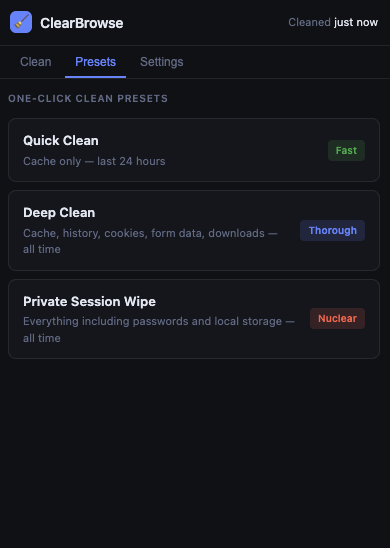
ClearBrowse Presets tab — Quick Clean, Deep Clean, Private Session Wipe
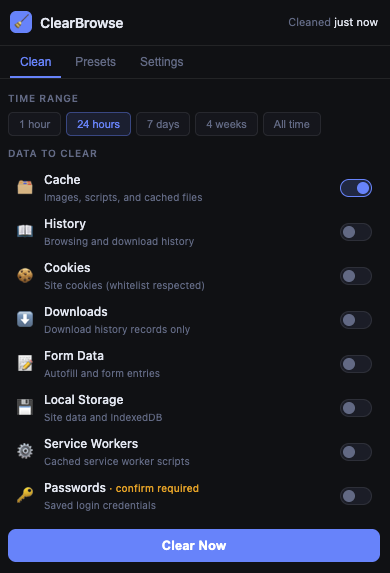
ClearBrowse Clean tab — 8 data types with toggles and Clear Now button
8
Data types
3
Clean presets
5
Time ranges
0
Data collected
Free
Always

// WHAT IT CLEARS
Everything browsers hoard.
Pick exactly what you want cleared, or use a preset. All operations use the official Chrome browsingData API — no third-party dependencies.
🗂️
Cache
Images, scripts, stylesheets, and all other cached resources stored by Chrome.
📖
History
Browsing history and download history records. Download files are not deleted.
🍪
Cookies
Site cookies across all domains. Add domains to the whitelist to keep specific logins.
⬇️
Downloads
Download history entries in Chrome's download manager. Actual files are untouched.
📝
Form Data
Autofill suggestions and saved form entries Chrome has accumulated over time.
💾
Local Storage
Site-specific localStorage and IndexedDB data stored in your browser profile.
⚙️
Service Workers
Cached service worker registrations and their associated caches from installed PWAs.
🔑
Passwords
Saved login credentials. Always requires explicit confirmation before clearing.

// PRESETS
One click for common jobs.
Three presets cover the most common cleanup scenarios. Jump to the Presets tab and click — no toggles needed.
FAST
Quick Clean
Clears the cache from the last 24 hours. The lightest option — good for a quick refresh when a page is showing stale content.
Cache
Last 24h
THOROUGH
Deep Clean
Clears cache, browsing history, cookies, form data, and download records across all time. Good for a periodic full reset.
Cache
History
Cookies
Form Data
Downloads
All time
NUCLEAR
Private Session Wipe
Wipes everything — including passwords, local storage, and service workers. Requires explicit confirmation. Use when handing off a device or ending a sensitive session.
Everything
All time
Confirm required

// HOW IT WORKS
No companion app. No server.
ClearBrowse runs entirely inside Chrome using the native browsingData API. Nothing runs outside the browser.
01
Click the extension icon
The popup opens. Select a time range and toggle which data types you want to clear — or switch to the Presets tab for one-click options.
02
Click Clear Now
ClearBrowse calls Chrome's native browsingData.remove() API. A progress bar runs, and a toast confirms when it's done.
03
Done — or set it and forget it
Enable auto-clean in Settings and ClearBrowse will run a Quick Clean automatically whenever Chrome closes. The header shows when you last cleaned.

// GET STARTED
Load it in 30 seconds.
ClearBrowse is a pure extension — no Node.js, no companion server, no terminal. Download the zip and load it.
1
Download clearbrowse.zip and extract it to a folder on your computer.
2
Open Chrome and go to chrome://extensions
3
Enable Developer Mode using the toggle in the top-right corner.
4
Click Load unpacked and select the extracted clearbrowse folder.
5
Pin ClearBrowse to your toolbar and click the icon to open the popup.
Requirements
🌐
Chrome or Chromium (any recent version)
🔧
Developer Mode enabled in chrome://extensions
Nothing else — no Node.js, no terminal, no setup
Permissions used
browsingData — to clear browser data
cookies — for the domain whitelist
storage — to persist your settings
windows — for auto-clean on close
// UPDATES

Changelog

Re-download the zip to get the latest version.

v1.0.2 March 2026 — Latest
FIX
Clean tab required scrolling to reach the Clear Now button. The hidden progress bar was reserving 26px of space via its margin even when invisible. It now collapses to zero height and margin when not in use, and the popup minimum height was corrected to fit all 8 data type rows without scrolling.
v1.0.1 March 2026
FIX
Passwords row misaligned in the Clean tab. Stacking the "Requires confirm" warning above the toggle caused that row to be taller than all others. The warning is now inline with the label and the toggle sits in its normal position.
FIX
Last cleaned timestamp not updating after preset cleans. The header now updates synchronously the moment a clean completes — the storage write happens in the background. Preset cards also show "Cleaning…" while running and "✓ Done" on success so there's clear feedback.
v1.0.0 March 2026 — Initial release
NEW
8 data types — cache, history, cookies, downloads, form data, local storage, service workers, and passwords. All cleared via the native chrome.browsingData API.
NEW
Three presets — Quick Clean (cache, 24h), Deep Clean (everything, all time), and Private Session Wipe (everything including passwords, with confirmation).
NEW
Cookie domain whitelist — domains added to the list are skipped when clearing cookies, keeping logins for trusted sites intact.
NEW
Auto-clean on browser close — runs Quick Clean automatically when the last Chrome window closes.
NEW
5 time ranges — 1 hour, 24 hours, 7 days, 4 weeks, and all time.